Spring 学习笔记 06:表单绑定与服务端校验
把表单字段绑到对象上,用 Bean Validation 注解做服务端校验,把错误信息显示回用户刚填的那一页,再补上自定义校验注解与全局异常处理。
本文是 《Spring 学习笔记》 系列的第 6 篇,共 12 篇
这是一份个人学习笔记:概念部分是我按自己的理解写的,示例代码都是自己敲的,参考的是 Spring 官方文档、Jakarta Bean Validation 规范与 Thymeleaf 官方文档。理解有偏差的地方 欢迎指出。
0 表单为什么比查询难
「新增一本书」这个功能,要把事情串起来:
- 打开表单页,显示一个空表单(下拉框里还要有分类列表);
- 用户填错提交,回到同一页,保留他刚填的内容,并指出哪里填错了;
- 全部合法才存库,然后跳转到一个干净的地址(避免刷新重复提交)。
查询只要「取数据 → 渲染」,表单要处理双向的数据流:从对象到页面(回填),再从页面到对象 (绑定)。这一篇把这条链路走完。
1 表单对象与 @ModelAttribute
用专门的对象接收表单,而不是一堆 @RequestParam:
package com.example.library.dto;

import com.example.library.validation.PastOrCurrentYear;
import jakarta.validation.constraints.Max;
import jakarta.validation.constraints.Min;
import jakarta.validation.constraints.NotBlank;
import jakarta.validation.constraints.NotNull;
import jakarta.validation.constraints.Pattern;
import jakarta.validation.constraints.Size;

public class BookForm {

    @NotBlank(message = "书名不能为空")
    @Size(max = 200, message = "书名不能超过 200 个字符")
    private String title;

    @NotBlank(message = "作者不能为空")
    private String author;

    @PastOrCurrentYear
    @Min(value = 1000, message = "出版年份看起来不对")
    @Max(value = 2100, message = "出版年份看起来不对")
    private Integer publishedYear;

    @Pattern(regexp = "\\d{13}", message = "ISBN 必须是 13 位数字")
    private String isbn;

    @NotNull(message = "请选择分类")
    private Long categoryId;

    // 下面这些 getter / setter 一个都不能少:
    // 绑定靠 setter,回填靠 getter,缺任何一个都会「绑定不上」或「值显示不出来」

    public String getTitle() {
        return title;
    }

    public void setTitle(String title) {
        this.title = title;
    }

    public String getAuthor() {
        return author;
    }

    public void setAuthor(String author) {
        this.author = author;
    }

    public Integer getPublishedYear() {
        return publishedYear;
    }

    public void setPublishedYear(Integer publishedYear) {
        this.publishedYear = publishedYear;
    }

    public String getIsbn() {
        return isbn;
    }

    public void setIsbn(String isbn) {
        this.isbn = isbn;
    }

    public Long getCategoryId() {
        return categoryId;
    }

    public void setCategoryId(Long categoryId) {
        this.categoryId = categoryId;
    }
}
三处细节值得单独说:
publishedYear用Integer而不是int。数字框留空时请求参数是空串,用基本类型会让字段绑定 失败并留下一个「必需字段缺失」的错误,用包装类型就没有这个副作用;@PastOrCurrentYear是这一篇第 5 节要写的自定义校验注解,「不能填未来年份」这种规则内置 注解表达不了;- 表单对象放在
dto包,Service 也直接用它(见下面的create),这样不用在 controller 和 service 之间再来一次拷贝。
控制器就是在 05 篇那个 BookViewController 上加两个方法,并多注入一个 CategoryService:
    private final CategoryService categoryService;

    public BookViewController(BookService bookService, CategoryService categoryService) {
        this.bookService = bookService;
        this.categoryService = categoryService;
    }

    @GetMapping("/new")
    public String form(Model model) {
        model.addAttribute("form", new BookForm());        // 空对象,th:object 靠它
        model.addAttribute("categories", categoryService.findAll());
        return "books/form";
    }

    @PostMapping
    public String create(@Valid @ModelAttribute("form") BookForm form,
                         BindingResult bindingResult,
                         Model model,
                         RedirectAttributes redirectAttributes) {
        if (bindingResult.hasErrors()) {
            model.addAttribute("categories", categoryService.findAll());  // 下拉框数据要重新准备
            return "books/form";
        }
        bookService.create(form);
        redirectAttributes.addFlashAttribute("message", "新增成功");
        return "redirect:/books";
    }
CategoryService 是这一篇新引入的(04 篇只给了 Category 实体),接口和实现都很短:
package com.example.library.service;

import com.example.library.domain.Category;

import java.util.List;

public interface CategoryService {

    List<Category> findAll();

    Category findByName(String name);
}
package com.example.library.service;

import com.example.library.domain.Category;
import com.example.library.repository.CategoryRepository;
import org.springframework.stereotype.Service;
import org.springframework.transaction.annotation.Transactional;

import java.util.List;
import java.util.NoSuchElementException;

@Service
@Transactional(readOnly = true)
public class CategoryServiceImpl implements CategoryService {

    private final CategoryRepository categoryRepository;

    public CategoryServiceImpl(CategoryRepository categoryRepository) {
        this.categoryRepository = categoryRepository;
    }

    @Override
    public List<Category> findAll() {
        return categoryRepository.findAll();
    }

    @Override
    public Category findByName(String name) {
        return categoryRepository.findByName(name)
                .orElseThrow(() -> new NoSuchElementException("分类不存在:" + name));
    }
}
它对应的仓储接口(04 篇只给了实体,这里补上):
package com.example.library.repository;

import com.example.library.domain.Category;
import org.springframework.data.jpa.repository.JpaRepository;

import java.util.Optional;

public interface CategoryRepository extends JpaRepository<Category, Long> {

    Optional<Category> findByName(String name);
}
最后是 BookService 新增的 create。接口加一行 Book create(BookForm form);,
BookServiceImpl 相应多注入一个 CategoryRepository:
    private final BookRepository bookRepository;
    private final CategoryRepository categoryRepository;

    public BookServiceImpl(BookRepository bookRepository, CategoryRepository categoryRepository) {
        this.bookRepository = bookRepository;
        this.categoryRepository = categoryRepository;
    }

    @Override
    @Transactional
    public Book create(BookForm form) {
        Category category = categoryRepository.findById(form.getCategoryId())
                .orElseThrow(() -> new NoSuchElementException("分类不存在:" + form.getCategoryId()));

        Book book = new Book(form.getTitle(), category);   // 02 / 04 篇那个「带分类」的构造器
        book.setAuthor(form.getAuthor());
        book.setIsbn(form.getIsbn());
        book.setPublishedYear(form.getPublishedYear());
        return bookRepository.save(book);
    }
@ModelAttribute 做了三件事:
- 把请求参数按名字写进对象属性(
title=重构→form.setTitle("重构")); - 把对象放进
Model,键名默认是「类名首字母小写」(BookForm→bookForm),用@ModelAttribute("form")可以改成form; - 因此表单页 GET 时也要放一个同名的空对象,否则
th:object="${form}"会报错。
为什么用专门的表单对象,而不是直接绑定 JPA 实体?因为两者关心的东西不同:实体关心持久化 (主键、版本、关联),表单关心输入(字段是否必填、格式)。混在一起,改一个就动全身。
2 模板侧的 th:object 与 th:field
<form th:action="@{/books}" th:object="${form}" method="post">

    <label for="title">书名</label>
    <input type="text" id="title" th:field="*{title}" th:errorclass="is-invalid">
    <span class="error" th:if="${#fields.hasErrors('title')}" th:errors="*{title}">书名不能为空</span>

    <label for="author">作者</label>
    <input type="text" id="author" th:field="*{author}">
    <span class="error" th:if="${#fields.hasErrors('author')}" th:errors="*{author}">作者不能为空</span>

    <label for="publishedYear">出版年份</label>
    <input type="number" id="publishedYear" th:field="*{publishedYear}">

    <label for="isbn">ISBN</label>
    <input type="text" id="isbn" th:field="*{isbn}">

    <label for="categoryId">分类</label>
    <select id="categoryId" th:field="*{categoryId}">
        <option value="">请选择</option>
        <option th:each="category : ${categories}"
                th:value="${category.id}"
                th:text="${category.name}">小说</option>
    </select>
    <span class="error" th:if="${#fields.hasErrors('categoryId')}" th:errors="*{categoryId}">请选择分类</span>

    <button type="submit">保存</button>
</form>
th:field="*{title}" 一个属性干了四件事,这是它比手写 th:value 好用的地方:
| 它做的事 | 效果 |
|---|---|
生成 name | name="title",绑定靠的就是这个名字 |
生成 id | id="title",<label for="title"> 才对得上 |
生成 value | 校验失败回填时,把用户上次填的值放回输入框 |
| 按类型自动处理 | 单选/复选/下拉自动选中正确项(selected / checked) |
*{...} 是「选中对象上的表达式」,作用范围是 th:object 指定的那个对象,等价于
${form.title},但省去了重复前缀。
几个细节:
th:field与name不要同时手写,会冲突;- 错误提示用
th:errors="*{title}",它会把该字段所有校验消息拼接输出;配合th:if="${#fields.hasErrors('title')}"可以控制空元素的显示; th:errorclass="is-invalid"在字段出错时追加 CSS class,前端样式直接用得上;- 绑定失败的字段(比如数字框里填了字母)不会回填——数据已经无效了,回填等于把脏值还给 用户,所以 Thymeleaf 会留空。
3 服务端校验:Bean Validation
3.1 先加依赖
<dependency>
    <groupId>org.springframework.boot</groupId>
    <artifactId>spring-boot-starter-validation</artifactId>
</dependency>
这一步很容易漏:Spring Boot 从 2.3 起不再默认包含校验实现,只写注解不加这个依赖,
@Valid 会静默失效——没有报错,校验就是不执行。这是本系列里最值得记住的坑之一。
3.2 常用约束注解
| 注解 | 作用 |
|---|---|
@NotNull | 不能为 null(空字符串可以) |
@NotBlank | 字符串不能为 null、空串、全空白 |
@NotEmpty | 字符串/集合/数组不能为空(可以是空白字符串) |
@Size(min, max) | 长度或集合大小范围 |
@Min / @Max | 数值范围 |
@Positive / @Negative | 正数 / 负数 |
@DecimalMin / @DecimalMax | 带小数的范围,可指定是否含边界 |
@Digits(integer, fraction) | 整数位与小数位上限 |
@Pattern(regexp) | 正则匹配 |
@Email | 邮箱格式 |
@Past / @Future | 日期在过去 / 将来 |
@AssertTrue / @AssertFalse | 布尔断言 |
选择上的两个提醒:
- 字符串一律优先
@NotBlank而不是@NotNull,否则用户提交一个空格就能过; @Pattern的正则里反斜杠要写成\\(Java 字符串转义),且尽量用锚定的写法,别指望 「部分匹配」。
3.3 校验在什么时候触发
只有在参数上明确写了 @Valid(或 @Validated),校验才会跑。触发时机是在数据绑定之后、
方法体执行之前,失败的结果全部记进紧跟其后的 BindingResult。
BindingResult 必须紧挨着被校验的参数,中间不能插别的参数:
// 对:BindingResult 紧接着 form
public String create(@Valid @ModelAttribute("form") BookForm form, BindingResult bindingResult, Model model)

// 错:中间隔了 Model,框架会直接抛 MethodArgumentNotValidException
public String create(@Valid @ModelAttribute("form") BookForm form, Model model, BindingResult bindingResult)
写错的后果不难观察:请求直接 400,Model 里的错误信息再也没机会渲染。
3.4 校验结果长什么样
BindingResult 里有两类问题,都算「有错」:
- 字段错误(
FieldError):某个字段不满足约束; - 全局错误(
ObjectError):不针对具体字段(比如「两次输入的密码不一致」)。用bindingResult.rejectValue("field", "code", "消息")和bindingResult.reject("code", "消息")手动添加。
要看整体结果,模板里可以用:
<ul th:if="${#fields.hasGlobalErrors()}">
    <li th:each="err : ${#fields.globalErrors()}" th:text="${err}">两次输入不一致</li>
</ul>
4 完整的流程
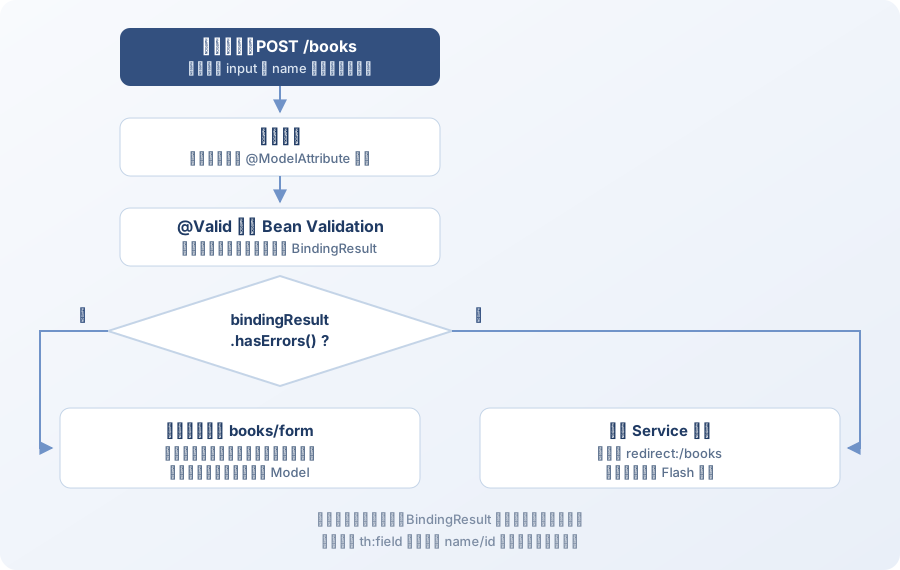
对照图看几个容易忽略的点:
- 下拉框的数据要在两条路径上都准备。校验失败返回
books/form时,categories不在Model里了(上一次请求的模型不会自动带过来),必须重新放。忘了这一步,页面上的下拉框会 变空——这是「校验失败后页面缺数据」最常见的原因; - 校验失败时数据库里什么都没发生,所以不需要事务回滚;
- 校验通过后走
redirect:,页面和 URL 都干净。
5 自定义校验注解
内置注解不够用时(比如「出版年份不能晚于今年」这种依赖上下文的规则),自己写一个:
package com.example.library.validation;

import jakarta.validation.Constraint;
import jakarta.validation.Payload;

import java.lang.annotation.Documented;
import java.lang.annotation.ElementType;
import java.lang.annotation.Retention;
import java.lang.annotation.RetentionPolicy;
import java.lang.annotation.Target;

@Documented
@Constraint(validatedBy = PastOrCurrentYearValidator.class)
@Target({ ElementType.FIELD })
@Retention(RetentionPolicy.RUNTIME)
public @interface PastOrCurrentYear {

    String message() default "年份不能晚于当前年份";

    Class<?>[] groups() default {};

    Class<? extends Payload>[] payload() default {};
}
package com.example.library.validation;

import jakarta.validation.ConstraintValidator;
import jakarta.validation.ConstraintValidatorContext;

import java.time.Year;

public class PastOrCurrentYearValidator implements ConstraintValidator<PastOrCurrentYear, Integer> {

    @Override
    public boolean isValid(Integer value, ConstraintValidatorContext context) {
        return value == null || value <= Year.now().getValue();
    }
}
用起来和内置注解一样:
@PastOrCurrentYear
private Integer publishedYear;
三个约定必须遵守,否则校验不会生效:
- 注解上要有
@Constraint(validatedBy = ...); - 注解里必须有
message()、groups()、payload()三个成员(groups和payload是规范 要求,缺了会报错); - 校验器实现
ConstraintValidator<注解, 字段类型>,把null当作合法——「是否必填」交给@NotNull那一组注解管,两件事不要混在一个校验器里。
6 全局异常处理
校验错误之外的问题(资源不存在、权限不足、数据库异常)如果每个控制器都 try-catch,
代码会很难看。集中处理用 @ControllerAdvice:
package com.example.library.web;

import org.springframework.ui.Model;
import org.springframework.web.bind.annotation.ControllerAdvice;
import org.springframework.web.bind.annotation.ExceptionHandler;

import java.util.NoSuchElementException;

/** 页面型控制器的统一异常处理 */
@ControllerAdvice(assignableTypes = { BookViewController.class, BookWizardController.class })
public class GlobalExceptionHandler {

    @ExceptionHandler(NoSuchElementException.class)
    public String handleNotFound(NoSuchElementException ex, Model model) {
        model.addAttribute("message", ex.getMessage());
        return "error/not-found";
    }
}
返回 JSON 的接口用 @RestControllerAdvice,直接返回响应体:
package com.example.library.web;

import org.springframework.http.HttpStatus;
import org.springframework.http.ProblemDetail;
import org.springframework.web.bind.annotation.ExceptionHandler;
import org.springframework.web.bind.annotation.RestControllerAdvice;

@RestControllerAdvice
public class ApiExceptionHandler {

    @ExceptionHandler(NoSuchElementException.class)
    public ProblemDetail handleNotFound(NoSuchElementException ex) {
        ProblemDetail detail = ProblemDetail.forStatusAndDetail(HttpStatus.NOT_FOUND, ex.getMessage());
        detail.setTitle("资源不存在");
        return detail;
    }
}
ProblemDetail 是 Spring 6 引入的、对应 RFC 7807 的标准错误体格式,比自定义一个
{"code":..,"msg":..} 更容易被客户端通用处理。
几点要注意:
- 异常处理方法要尽量具体。如果同时存在
@ExceptionHandler(Exception.class)和更具体的 处理方法,Spring 会选最匹配的那个,但一个兜底的Exception处理器会把 400/404 也吞掉, 变成「所有错误都返回 500」,反而更难排查; @ControllerAdvice可以限定生效范围:@ControllerAdvice(assignableTypes = BookViewController.class)(示例工程用的就是这种)、basePackages = "com.example.library.web",或按注解@ControllerAdvice(annotations = RestController.class);- 页面型和接口型的 advice 一定要分开限定。
@RestControllerAdvice默认作用于所有控制器, 不加限定的话,页面控制器抛异常时会返回一段 JSON 而不是错误页,用户看到的是一屏花括号。 示例工程里GlobalExceptionHandler用assignableTypes只盯页面控制器,第 11 篇的ApiExceptionHandler只盯 REST 控制器,两边互不干扰; - 它还能给所有控制器统一注入公共模型数据:
@ModelAttribute("currentYear")
public int currentYear() {
    return Year.now().getValue();
}
这样每个页面都能直接用 ${currentYear},不用每个控制器都塞一遍。
7 容易踩的坑
| 现象 | 原因 | 处理 |
|---|---|---|
| 校验注解写了但完全不生效,也不报错 | 少了 spring-boot-starter-validation 依赖 | 加上依赖重启 |
| 提交非法数据直接 400,页面没显示错误 | 参数上没写 @Valid,或 BindingResult 位置不对 | @Valid 与 BindingResult 必须相邻 |
th:object="${form}" 报空指针 | GET 进入表单页时没把空对象放进 Model | model.addAttribute("form", new BookForm()) |
| 字段一直绑不上,值永远是 null | input 的 name 与对象属性名不一致 | 用 th:field 生成 name,别手写 |
| 校验失败后下拉框空了 | 返回视图时没重新放下拉数据 | 失败分支里重新 addAttribute("categories", ...) |
表单对象是 record,绑定直接失败 | 绑定需要无参构造器 + setter | 表单对象用普通 class |
| 数字字段填了字母,结果字段是空的 | 类型转换失败会作为字段错误记录,不回填 | 这是预期行为;提示文案写清楚该填什么 |
错误信息显示的是 {jakarta.validation.constraints...} | 找不到对应语言的校验消息 | 在 messages.properties 里提供对应键,或每个注解都写 message |
| 自定义校验注解不生效 | 缺 @Constraint、缺 groups/payload,或校验器没注册 | 按第 5 节三个约定逐条检查 |
| 所有 404 都变成 500 | 兜底的 Exception 处理器把所有异常都接走了 | 兜底处理器里显式处理 NoHandlerFoundException 等,或不要兜底 |
| 提交成功刷新页面又提交一次 | 没有走重定向 | 成功后 redirect: |
8 小结
- 表单用专门的表单对象接,不直接绑实体;对象要有无参构造器与 setter;
- 模板侧用
th:object+th:field:一个属性负责name、id、回填和选中; - 服务端校验用Bean Validation 注解,并且必须引入
spring-boot-starter-validation, 否则@Valid会静默失效; BindingResult必须紧跟被校验的参数;- 校验失败返回表单视图时要重新准备下拉数据;
- 校验通过后走 PRG(
redirect:),一次性提示用 Flash 属性; - 内置注解不够就自定义约束(
@Constraint+ConstraintValidator),记得null视为合法; - 错误统一用
@ControllerAdvice/@RestControllerAdvice处理,REST 用ProblemDetail。
页面的骨架已经有了,但每个页面重复写导航栏、页脚会很痛苦。下一篇讲 Thymeleaf 的片段复用 与国际化,把模板也「组件化」。